
Data Processing
Data Processing gigs from Buxonline freelancers, starting at $1.

 irinechepngetich5New Seller
Spreadsheet cleanup, catalog tagging, and SEO Pinterest pins — all in one gig for small sellers."
$100
 haris406New Seller
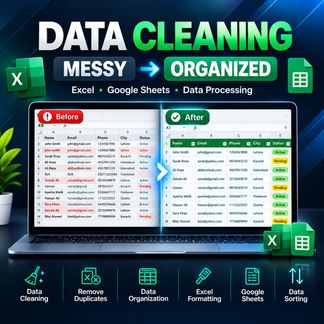
I will turn messy, duplicate or unorganized spreadsheet data into a clean and organized Excel or Google Sheets file.
$100
 hassanrazzaq42726New Seller
Need a reliable Python developer for a Machine Learning or AI project? I will build a clean, practical and well-documented ML solution using Python and popular machine learning libraries. What I can help with: Data preprocessing and cleaning Exploratory data analysis (EDA) Feature selection and feature engineering Regression and classification models Model training and evaluation Hyperparameter tuning Performance analysis Machine Learning notebooks Basic Deep Learning solutions AI and RAG prototypes using your documents/data Python ML scripts and documentation ML algorithms I can work with include: Linear Regression, Logistic Regression, Decision Trees, Random Forest, KNN, SVM, clustering and other suitable scikit-learn models. For RAG projects, I can help create a basic document-based question-answering system using Python and appropriate LLM/vector-search tools. You will receive clean code
$100
About data processing
Data processing transforms raw information into a structured, usable form through systematic operations like cleaning, sorting, aggregating, filtering and reformatting. It sits between data collection and analysis, turning messy inputs—spreadsheets with inconsistent formatting, logs with duplicate entries, forms with incomplete fields—into datasets ready for reporting, integration or decision-making. The work might involve removing duplicates from a customer list, converting timestamps across time zones, splitting concatenated address fields, or merging records from multiple sources into a single table.
Doing this work well means preserving accuracy while improving consistency. A competent processor documents every transformation, validates outputs against known totals or checksums, and handles edge cases without silently dropping records. Poor processing introduces errors that compound downstream: a mishandled null value becomes a zero that skews averages, a botched character encoding turns names into gibberish, or an undocumented filter quietly excludes valid records. The difference often shows up months later when someone questions why figures don't reconcile.
The work ranges from one-off tasks—preparing a mailshot list, anonymising survey responses—to building repeatable pipelines that run daily or hourly. Tools span Excel formulas and Python scripts through to dedicated platforms like Alteryx or Talend. Scale matters: techniques that work for ten thousand rows break or become impractical at ten million. A skilled processor knows when a manual spot-check suffices and when automated validation is essential.
Guides related to data processing
Data Processing — questions and answers
- What happens if you process data in the wrong order?
- Sequence matters because later steps often depend on earlier ones. If you remove duplicates before standardising formats, records that should match won't be recognised as duplicates. If you filter rows before aggregating, your totals reflect only the subset. If you apply currency conversion after summing, exchange rates compound incorrectly. Reversing steps can produce results that look plausible but are quietly wrong.
- How do you verify that processing hasn't lost or altered records incorrectly?
- Compare row counts and control totals before and after each step. Hash critical fields to detect unintended changes. Spot-check a random sample of outputs against inputs. For high-stakes work, process a subset with known characteristics first and confirm the results match expectations. Logging every transformation lets you trace discrepancies back to the step that introduced them.
- Why do text encoding problems appear during processing even when the source file opens fine?
- Applications often guess encoding when displaying files, masking issues until data moves between systems. A file saved as Windows-1252 might show correctly in Excel but produce garbled characters when imported into a UTF-8 database. Processing exposes these mismatches because it explicitly reads and writes bytes. Specifying encoding at every read and write operation prevents silent corruption.
- When should you split processing into multiple passes instead of doing everything at once?
- Split when intermediate outputs need manual review, when different steps require different tools, or when debugging becomes difficult. A single complex script that fails halfway through wastes time re-running early steps. Separate passes also let you checkpoint progress—useful when processing takes hours or when source data might change mid-project. The trade-off is managing intermediate files and ensuring they stay synchronised.
- What makes a processing script reusable versus one that only works once?
- Reusable scripts parameterise inputs, outputs and key values rather than hardcoding them. They handle variations in source data—extra columns, different delimiters, unexpected nulls—without breaking. They log what they did and flag anomalies rather than failing silently. Documentation explains assumptions: which fields must exist, what formats are expected, how errors are handled. A one-off script works for today's file; a reusable one works for next month's too.
- How do you process data that's too large to fit in memory?
- Stream it in chunks, processing one batch at a time and writing results incrementally. Use databases or tools designed for out-of-core processing like Dask or chunked Pandas reads. Sort or filter early to reduce volume. For aggregations, calculate running totals rather than loading everything first. Avoid operations that require seeing the entire dataset simultaneously—those force you into distributed processing frameworks or sampling approaches.


