Proofreading & Editing
Proofreading & Editing gigs from Buxonline freelancers, starting at $1.

 redpenrubyLevel 3
I'll catch grammar, spelling and punctuation errors in your text and mark them in Google Docs.
 4
4$100
 redpenrubyLevel 3
I'll check your newsletter draft for errors and awkward phrasing before it goes to subscribers.
5$300
 redpenrubyLevel 3
I'll check up to 10 short captions for typos and clarity before you post them.
5$300
 redpenrubyLevel 3
I'll fix errors in up to 10 product descriptions so they read professionally.
$300
 muhamadahmed13579New Seller
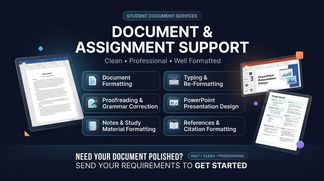
I will professionally format, type, proofread, and organize your documents, assignments, notes, and presentations with a clean, polished layout.
$100
 karabothobakgale576New Seller
I will proofread and edit your work before you submit or post them to adoid any kind of mistakes
$100
 amalbutta123New Seller
I provide professional proofreading and editing to make your content clear, polished, and error-free. I will correct grammar, spelling, punctuation, sentence structure, clarity, and readability while maintaining your original voice and meaning
$100
 uvinduananda02Level 2
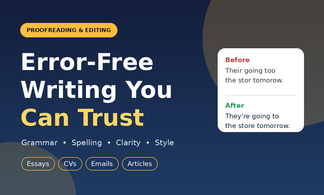
Fast, careful proofreading for essays, emails, CVs and articles. I fix errors and make your writing clearer.
$100
 balantrapuashrit05New Seller
Turn rough drafts into polished, publication-ready writing. A great message can easily get lost behind awkward sentence structures, grammar slips, or robotic phrasing. I will carefully review and refine your document to ensure it reads cleanly, fluently, and authoritatively. What I check and improve: Grammar, spelling, and punctuation Sentence flow, tone, and pacing Vocabulary enhancement and clarity Consistency in style and capitalization Rewriting robotic or awkward AI-generated text to sound completely natural You will receive: One document with Tracked Changes (so you can see every edit made). One clean document ready for use. Have a custom word count or an urgent deadline? Drop me a message and I'll send a custom offer right away.
$100
 hinanaz9405New Seller
Send me your short text, article, or blog post, and I will thoroughly check and fix grammar, spelling, punctuation, and basic flow issues. Delivered clean and professional in your preferred document format. Perfect for catching errors before you publish!
$100
 EllieNew Seller
Want to improve your article or blog post but don't know where to start? No worries—that's where I come in. Send me your article or blog post, and I'll carefully proofread it for grammar, spelling, punctuation, and clarity. I'll make sure your writing is polished and easy to read while keeping your original voice and style intact.
$100
 josephmweri118New Seller
Get clean, error-free, and professional writing! I will thoroughly proofread your document to fix grammar, spelling, punctuation, and typos while improving overall flow and readability[cite: 1]. Fast 24-hour delivery in Google Docs or Word[cite: 1].
$100
 naseriangodwinNew Seller
My goal is to ensure your document is polished, error-free, and professionally presented while maintaining your original voice and message. Fast delivery, attention to detail, and client satisfaction are guaranteed.
$100
 tehminarazaLevel 2
Professional proofreading, thesis formatting, grammar correction, academic editing, and citation support for students and researchers. Careful attention to detail Clear and professional communication Original meaning preserved Delivery within the agreed timeframe Revisions according to the agreed requirements Please send me your document and requirements before placing an order so we can discuss the scope of work. I look forward to helping you improve your academic document!
$100
 BENJAMIN MUNYILUNew Seller
I will proofread, edit, and polish your document with perfect grammar and clarity.
$100
 sharifjumong78New Seller
I will provide clean, accurate, and well-formatted documents with proper grammar, punctuation, and clear structure. I will ensure your text is easy to read, professionally presented, and free from avoidable errors. Suitable for reports, letters, assignments, and other documents, with careful attention to detail and timely delivery.
$100
About proofreading & editing
Proofreading and editing are separate stages in refining written material before it reaches its audience. Proofreading is the final check for surface errors: typos, misspellings, punctuation mistakes, inconsistent capitalisation, and formatting glitches. It assumes the text is otherwise complete. Editing goes deeper, working on structure, clarity, tone, grammar, and sometimes factual accuracy. A developmental editor might reshape entire sections or question whether an argument holds together, while a copy editor tightens sentences, fixes ambiguities, and enforces house style. Line editing focuses on flow and readability at the sentence level.
The distinction matters because each type of intervention requires different skills and happens at different points in a project. Running a proofread on a draft that still needs structural work wastes time; doing a heavy edit when only typos need catching introduces unnecessary risk. Good proofreading is invisible—the reader never notices it happened. Good editing preserves the author's voice while making the text do its job better, whether that job is persuading, informing, entertaining, or instructing. Poor editing homogenises voice or inserts errors while fixing others; poor proofreading lets through inconsistencies that undermine credibility, like switching between British and American spelling or leaving tracked changes visible in a published document.
Guides related to proofreading & editing
Proofreading & Editing — questions and answers
- What's the difference between proofreading and copy editing?
- Proofreading catches surface errors—typos, spacing issues, punctuation mistakes—in text that's otherwise finished. Copy editing addresses grammar, clarity, consistency, tone, and factual checking. Copy editors rewrite clumsy sentences and query unclear passages; proofreaders mark errors but don't rewrite. Copy editing happens earlier in the production cycle, proofreading last.
- Should edits be made in Track Changes or directly in the document?
- Track Changes (or equivalent tools like Google Docs suggestion mode) lets the author see every alteration and accept or reject each one. Direct editing is faster but removes that visibility. Light proofreading often uses direct edits with a summary note; substantive editing nearly always uses tracked changes so the author understands what shifted and why.
- How do you handle British versus American English when proofreading?
- Choose one standard and apply it throughout unless the text deliberately mixes them for effect. This covers spelling (colour/color), punctuation (single versus double quotation marks), vocabulary (lorry/truck), and date formats. A style sheet recording decisions—especially for terms that appear frequently—prevents inconsistency. Mixed usage within one document looks careless.
- Can you edit something outside your subject area, or do you need specialist knowledge?
- General editors handle structure, clarity, grammar, and readability across most topics. Technical or specialist texts—medical journals, legal documents, scientific papers—often need editors familiar with the terminology, conventions, and standards of that field. A generalist might query unclear passages but miss a misused technical term that changes meaning entirely.
- What does it mean to edit for house style, and where does that style come from?
- House style is an organisation's set of preferences: whether to use the Oxford comma, how to format numbers and dates, which spelling standard to follow, how to capitalise headings. Publishers, corporations, and journals maintain style guides so all their output looks consistent. Editors apply these rules throughout a document, overriding the author's personal preferences.
- Why do proofreaders mark up PDFs differently than Word documents?
- PDFs are often final layouts where changes affect pagination, so proofreaders use annotation tools or traditional proofreading marks to flag errors for a designer to fix. Word documents allow direct editing or tracked changes. The format determines how corrections are communicated—PDFs need precise location markers because text can't simply be retyped without affecting design.


